
census:qgis
Download Census Data
Downloading Census Data for PUMA (Names) The data can be found on the census site itself:
- Scroll down until you see: 2020 PUMA Names File [<1.0 MB]
- Download the file
- Because the file is in acrobat, use Google Docs to open it.
- Then copy and paste into a file using VI
- Use the following commands to format the data for uploading.
| Command | Explanation |
|---|---|
| :%s/\%3c/,/g | Add a comma for column 3 |
| :%s/\%10c/,“/g | Now add a comma for column 10 |
| :1,$ s/$/\”/g | Place double quotes at the end of every line |
| :1,$ s/ “/”/g | Replace space/double quotes with just double |
| :1,$ s/“ /”/g | Replace double/space with just double |
| :1,$ s/, /,/g | Remove spaces after commas |
Downloading Census Data for the Languages
NOTE: Use the Chrome browser
- Go to: https://usa.ipums.org/usa/
- Create an account if you don’t already have one.
- After creating an account and signing in, click “Create Your Custom Data Set
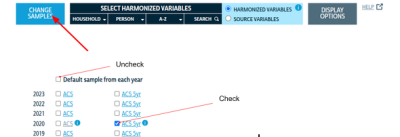
- CLick “Submit Sample Size”
- Add Variables:
- Household → Geographic → PUMA & STATEFIP
- Person → Demographic → Age
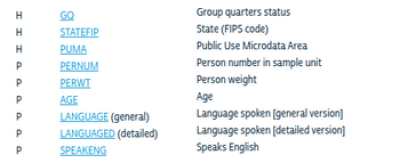
- Person → Race, Ethnicity, Nativity → SPEAKENG & LANGUAGE
- View Data Cart → Create Data Extract
- Change Data Format to “.csv”
- Click Show and you should see the following:
- Click “Submit Extract”


NOTE: When the job is finished, you will receive and email. You can then download the “.gz” file and load as required.
census/qgis.txt · Last modified: by mlivolsi